

Implementing Analytics in DFMPro: A Practical Framework
DFMPro stands as a prominent example of a tool that can effectively integrate the full spectrum of analytics—descriptive, diagnostic, predictive, and prescriptive—directly into the product design workflow. It bridges the gap between design intent and manufacturing reality, empowering engineers to make informed decisions early in the development cycle. By providing real-time and batch analysis capabilities, DFMPro facilitates a seamless transition to data-driven DFM.
Key Features of DFMPro Enabling Analytics
1. Real-Time Feedback within CAD Environments:
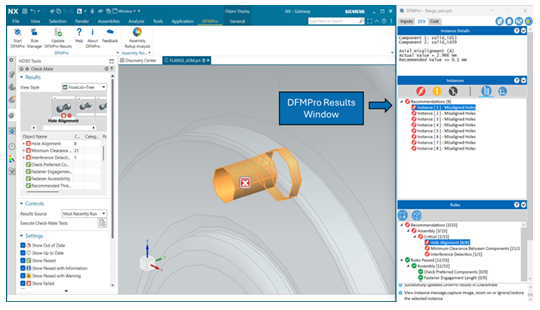
One of DFMPro’s most powerful features is its ability to provide instant manufacturability insights directly within the native CAD environment (e.g., SolidWorks, Creo, NX, CATIA). As designers create or modify geometry and validate the design, DFMPro runs checks against pre-configured or custom DFM rules. If a rule is violated (e.g., minimum wall thickness, draft angle, hole depth-to-diameter ratio), the system provides immediate visual feedback, highlighting the problematic area and offering specific, context-sensitive recommendations. This “shift-left” approach means issues are identified and resolved at the point of creation, preventing them from propagating downstream where resolution costs escalate exponentially. This feature exemplifies prescriptive analytics in action, guiding designers to optimal solutions. The software may also bring in a summary of past reviews and previous prescriptions from reviewers on similar instances encountered on other designs in the past. This will allow organizations to easily apply lessons learnt early in the design cycle.
2. Batch Analysis for Comprehensive Evaluation:
Beyond real-time feedback, DFMPro supports batch analysis, allowing Subject Matter Experts (SMEs) and managers to evaluate large repositories of designs (e.g., an entire assembly, a folder of legacy parts, or designs from a specific project) against multiple DFM guidelines simultaneously. This capability is invaluable for:
- Auditing existing design libraries for manufacturability compliance.
- Assessing the overall DFM maturity of a product line.
- Identifying common DFM issues across multiple designs, providing data for diagnostic analysis.
- Benchmarking supplier design practices against internal standards.
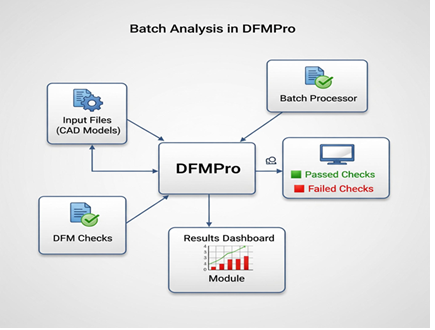
Batch analysis provides the aggregated data necessary for descriptive and diagnostic insights, informing strategic improvements.
3. Closed Loop Collaboration
A designer working with a CAD model can run DFMPro interactively to get recommendations on the design and update the design accordingly. Any recommendations which cannot be acted on can be dispositioned with appropriate comments and images. DFMPro is executed again to get the revised results. Any ignored issues are retained with the earlier images and comments. Any issues needing additional information from manufacturing or supplier or senior reviewers can also be tagged with comments. This process is repeated till only ignored issues and issues under review remain. The results are then checked in along with the CAD model.
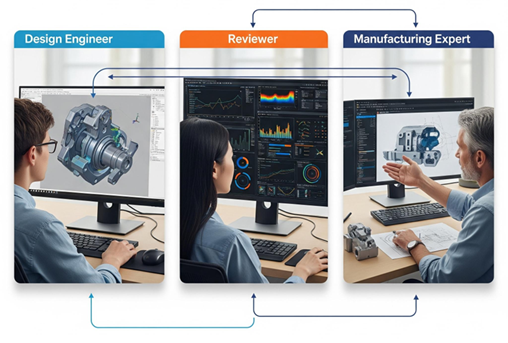
A review notification can be sent to a reviewer who can review the ignored issues and the open issues where the designer needs additional guidance. The reviewer can review the items needing attention, include comments, images and update the results back into the PLM system along with the same CAD revision. A notification for this is sent back to the designer. This iterative collaboration loop can continue till the design is ready for release.
4. DFX Analytics Platform:
DFMPro often integrates with or provides a dedicated DFX (Design for eXcellence) Analytics Platform. This platform serves as a central repository for all DFM analysis results. It captures detailed data on rule pass/fail trends, violation types, severity, associated components, and resolution times. This structured data is then utilized for comprehensive descriptive and diagnostic reporting.
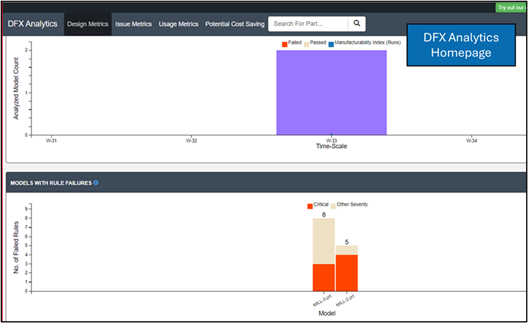
The platform supports collaborative review processes, allowing design and manufacturing engineers to jointly analyze DFM issues, track resolutions, and annotate designs. This collaborative environment is crucial for fostering shared understanding and iterative improvement. The data captured in DFX Analytics serves as one of the foundations for applying AI/ML and continuous learning in DFMPro.
5. Costing Integration and Prediction:
A critical aspect of DFM is its impact on manufacturing cost. DFMPro often includes robust costing integration, allowing it to predict manufacturing cost drivers directly from DFM analysis results. For example, a complex geometry flagged for excessive machining operations would automatically reflect higher machining costs. The system can track deviations from target costs, providing early warnings if a design’s manufacturability makes it economically unviable. This predictive capability allows designers to make cost-conscious decisions in real-time, optimizing for both manufacturability and cost efficiency.

6. Custom Rule Configuration::
A significant strength of DFMPro is its flexibility in allowing users to define, customize, and manage their own DFM rules. This means organizations can tailor the software to their unique manufacturing processes, machine capabilities, material properties, and supplier constraints. This customization ensures that the analytics are always relevant to their specific operational context, leading to highly accurate and actionable insights. Starting with custom rule development through programming, DFMPro has now advanced towards no-code rule development using the Visual Rule Modeler.
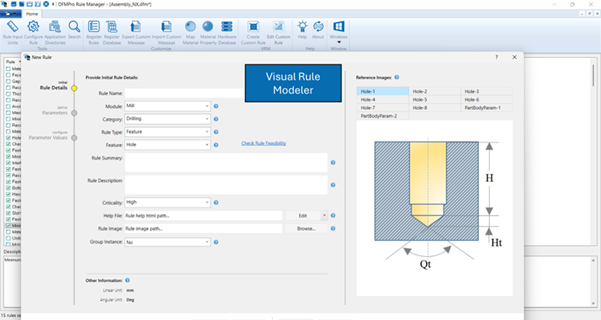
Additionally, it continues to advance towards a future version which will not need rules to be explicitly defined in the software. We can imagine a workflow where the CAD design features, parameters and relationships are directly mapped against an organizational knowledge base consisting of documents containing design guidelines, lessons learnt, etc. This is an exciting phase of the evolution which has become a potential reality due to the rapidly maturing artificial intelligence models and machine learning technologies.
Deployment Strategies for DFM Analytics
1. Client-Side and Server-Side Setups:
- Client-Side: DFMPro can be deployed directly on individual CAD workstations, providing immediate feedback during design. This is ideal for interactive, real-time analysis where low latency is critical.
- Server-Side: For batch analysis of large assemblies or entire design repositories, DFMPro can be deployed on a server. This offloads computational intensity from individual workstations and allows for scheduled, automated analysis runs, typically overnight. The same servers can also be used for PLM based automation where models are automatically analyzed based on triggers such as check-ins, review phases,etc.
2. Integration with PLM Systems:
Seamless integration with Product Lifecycle Management (PLM) systems is paramount. PLM serves as the single source of truth for all product data—from conceptual design to end-of-life. DFMPro integrates with PLM to:
- Pull design data (CAD models, BOMs, parameters) for analysis.
- Push DFM analysis results, reports, and recommended design changes back into the PLM system, ensuring traceability, version control, and accessibility for all stakeholders. This integration creates a closed-loop system for continuous improvement.
Implementing DFM analytics through a tool like DFMPro is not merely about adopting software; it’s about establishing a data-driven culture that prioritizes manufacturability from the earliest stages of design. It transforms DFM from a late-stage validation step into an integrated, continuous process, delivering tangible benefits across the product development lifecycle.
In the next part of this blog series, we will look at the real world examples of DFM analytics in action. Stay tuned!